Category Archives: minipost - Page 2

Post-jump, things everywhere die

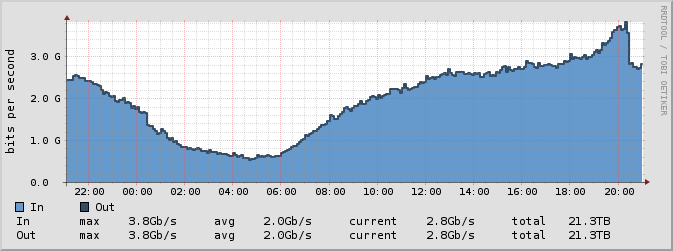
Always a bit interesting to check out stats for things on the internet after a major event like Felix Baumgartner’s jump from space today. Here’s a graph for JINX, one of the two .za INXs.

Interestingly, it seems to have all come from only one of the two GGCs that are visible via that path.

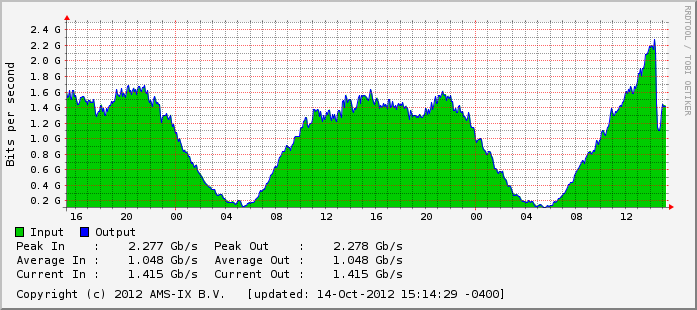
Elsewhere we see similar drops, and also some of the GGCs dying (502’s were served up for a while). Here’s the CAR-IX stats:

During the stream, some people were handed off to Akamai edge nodes. I don’t have that much information on what was happening in all the various networks, though. Will be interesting to see that coming to light soon from the likes of Renesys and such.

Update: I see the first image from this page made it onto one of the .za news syndicators without credit. Nice of them.

Old tricks, new coins; same problems

In setting up some mirrors recently, I’ve come to learn that rsync’s algorithm by default doesn’t deal well with long-haul TCP going hand in hand with small files. I still need to set aside some time to find a nice set of optimization flags to tweak that up a bit more. And when I say “doesn’t deal well”, I mean in the region of “can tx about 1/3rd a single-session TCP speedtest can do over the same path”. Later’s worry, though.

So, the point of this point:

receiver$ nc -l 1234 | pv | tar xf
sender$ tar cf - moz | pv | nc receiver.domain.tld 1234

And there you have a minimal-CPU-usage streaming file delivery setup. Of course, this doesn’t deal with retransmits or anything else. This just gets the bulk over. After that you can run an rsync with big block lengths over all of it, and get any files fixed using that.

And the “old trick” part of this? As far as I know, this is pretty much how the whole tape drive thing used to work[0]. I’ve just added some internet in the middle.

[0] – I wouldn’t know for certain, before my time

Elegua

Public Service Announcement

Anyone who makes use of elegua, the transition of services on it is now complete and I’ve updated the main A and AAAA records to point at the new host.

If you have any issues, you know where to find me.

(That said, the original TTLs were like six gazillion years or something, so caches might flush later as they go. Query the upstream NS for the new record if you need it.)

Fun things to come home to

*sigh*….so much for the idea of doing work on Coursera thing (I just signed up for today) tonight:

yariman# tail -n 100 syslog | grep ppp
Sep 10 16:44:41 yariman pppd[24971]: Plugin rp-pppoe.so loaded.
Sep 10 16:44:41 yariman pppd[24972]: pppd 2.4.5 started by root, uid 0
Sep 10 16:45:16 yariman pppd[24972]: Timeout waiting for PADO packets
Sep 10 16:45:16 yariman pppd[24972]: Unable to complete PPPoE Discovery
Sep 10 16:46:21 yariman pppd[24972]: Timeout waiting for PADO packets
Sep 10 16:46:21 yariman pppd[24972]: Unable to complete PPPoE Discovery
Sep 10 16:47:26 yariman pppd[24972]: Timeout waiting for PADO packets
Sep 10 16:47:26 yariman pppd[24972]: Unable to complete PPPoE Discovery
Sep 10 16:48:31 yariman pppd[24972]: Timeout waiting for PADO packets
Sep 10 16:48:31 yariman pppd[24972]: Unable to complete PPPoE Discovery
Sep 10 16:49:36 yariman pppd[24972]: Timeout waiting for PADO packets
Sep 10 16:49:36 yariman pppd[24972]: Unable to complete PPPoE Discovery
Sep 10 16:50:41 yariman pppd[24972]: Timeout waiting for PADO packets
Sep 10 16:50:41 yariman pppd[24972]: Unable to complete PPPoE Discovery
Sep 10 16:51:46 yariman pppd[24972]: Timeout waiting for PADO packets
Sep 10 16:51:46 yariman pppd[24972]: Unable to complete PPPoE Discovery
Sep 10 16:52:51 yariman pppd[24972]: Timeout waiting for PADO packets
Sep 10 16:52:51 yariman pppd[24972]: Unable to complete PPPoE Discovery
Sep 10 16:53:00 yariman pppd[24972]: Terminating on signal 15
Sep 10 16:53:00 yariman pppd[24972]: Exit.

Line sync’d where it always has, good signal vs noise, etc. DSLAM or something in the middle just missing. Now to wait and hope my ticket gets to a useful support person. It *sucks* not having access to the local loop.

And Justin Case™ you couldn’t guess it, that post title is a lie.

Everything is not “just a string”

During a quick conversation on unicode and punycode, I managed to find http://☁→❄→☃→☀→☺→☂→☹→✝.ws

Cute, and a sad reminder of how many people still fight this.

Should I buy some stock?

thoughts: I still have some stock account balance left..wonder if I should buy some..

In [1]: from random import choice
In [2]: choices = {'buy': 0, 'wait': 0}
In [3]: for i in range(0,5000):
    choices[choice(['buy','wait'])] += 1
   ...:
In [4]: choices
Out[4]: {'buy': 2518, 'wait': 2482}

Guess I’ll buy some stocks.

[ed's note: this method works equally well to decide which stocks you want to buy when you're lazy]

S(hitty)NMP

This post will highlight Mikrotik/RouterOS issues, but it’s certainly not only them that suffer from S(hitty)NMP implementations.

Far be it from me thinking SNMP is perfect, nor that it’s necessarily always a good idea. I just have to wonder how it’s possible to screw up such a simple thing.

For example, Mikrotik has this nifty feature where you can look up the OIDs in a specific context by calling the print command with the parameter oid:

[user@R1] /system resource> pri oid
           uptime: .1.3.6.1.2.1.1.3.0
  total-hdd-space: .1.3.6.1.2.1.25.2.3.1.5.131073
   used-hdd-space: .1.3.6.1.2.1.25.2.3.1.6.131073

Except then this happens:

mon# snmpwalk -c ${com} -v 2c ${host} 1.3.6.1.2.1.25.2.3.1.5.131073
HOST-RESOURCES-MIB::hrStorageSize.131073 = No more variables left in this MIB View (It is past the end of the MIB tree)
mon# snmpwalk -c ${com} -v 2c ${host} 1.3.6.1.2.1.25.2.3.1.6.131073
HOST-RESOURCES-MIB::hrStorageUsed.131073 = No more variables left in this MIB View (It is past the end of the MIB tree)

The situation has at least improved vastly, though. Instead of finding the MIB file in some godforsaken dead corner of their documentation site (which is basically just kept on life support), the wiki has a formal section for it now. Still…things could be better:

  • Still no trap support in the various routing protocols/daemons (as far as I know)
  • Various bits of inconsistency like the above items
  • Indexes on dynamic interfaces and the like change, and with no way (that I’m aware of, once again) to lock them to a specific index irrespective of interface state.

There’s another issue that might’ve been fixed in the meantime, I haven’t checked in a while. SNMPv1 has a specific set of counter types, and anything bigger than n (where n was some signed integer limit or something) would only be displayable in SNMPv2. RouterOS just decided to not care about this at all, and respond with the number under the same counter type, but only ever when using SNMPv1.

Seriously, why is this stuff so broken?

HP iLO(2) tapdance

Most people who run bigger sorts of servers are probably familiar with OOB management systems, but for those who aren’t here’s a short summary: you pay a little bit more when you buy your server, and you get a fantastical tool (vendors, please, get this stuff to fit the modern age. It’s not like we don’t want to use them) to use with your server. Power control, hardware status info, (usually) full IP KVM, etc. HP, Dell, Supermicro, Cisco UCS all have this in their own respective flavours.

That’s just to set the tone for what follows. So let’s pretend you live in .za, and you have crappy upstream bandwidth from your home. This would make things like firing up the HP SmartStart ISO on your hardware pretty painful, because uploading all that data takes forever. So what do we do?

We download it to another box on the same network and load up the image via a “hidden” section of iLO that allows us to mount images from an HTTP source, of course:

</>hpiLO-> show
status=0
status_tag=COMMAND COMPLETED

/
  Targets
    system1
    map1
  Properties
  Verbs
    cd version exit show

</>hpiLO-> cd /map1/oemhp_vm/cddr
status=0
status_tag=COMMAND COMPLETED

/map1/oemhp_vm/cddr

</map1/oemhp_vm/cddr>hpiLO-> show
status=0
status_tag=COMMAND COMPLETED

/map1/oemhp_vm/cddr
  Targets
  Properties
    oemhp_image=None
    oemhp_connect=No
    oemhp_boot=No_Boot
    oemhp_wp=No
    oemhp_applet_connected=No
  Verbs
    cd version exit show

</map1/oemhp_vm/cddr>hpiLO-> set oemhp_image=http://192.0.2.1/helpstuff/<ISO_Name_Here.iso>
status=0
status_tag=COMMAND COMPLETED

</map1/oemhp_vm/cddr>hpiLO-> set oemhp_boot=Connect
status=0
status_tag=COMMAND COMPLETED

</map1/oemhp_vm/cddr>hpiLO-> show
status=0
status_tag=COMMAND COMPLETED

/map1/oemhp_vm/cddr
  Targets
  Properties
    oemhp_image=http://192.0.2.1/helpstuff/<ISO_Name_Here.iso>
    oemhp_connect=Yes
    oemhp_boot=Always
    oemhp_wp=Yes
    oemhp_applet_connected=No
  Verbs
    cd version exit show

So, in summary:

We cd to the path that contains cddr (which is the virtual disc path). A note on this, the vm path might sometimes be oemhp_vm1. Do a show under /map if you can’t find the thing.
Then we set oemhp_image and oemhp_boot to values useful for booting.
Now we reboot.

After you’re done with stuff, just set oemhp_boot to Never, and it’ll disconnect stuff.

I didn’t check whether this worked for iLO3 as well, but I’d guess it’s relatively similar. Been a few months since I even looked at an iLO3 system. Here’s the command ref doc for iLO2 if you want to dig around for some more cool stuff.

Timejumps

So today/tonight/sometime is leap second day. I’m not too sure when it is, exactly. Why? Because I don’t need to:

Jun 30 14:43:09 stratum1 lantime[1850]: Normal Operation  
Jun 30 14:43:17 stratum1 lantime[1850]: Leap second announced  
Jun 30 14:44:12 stratum1 ntpd[2172]: synchronized to PPS(0), stratum 0
Jun 30 14:44:13 stratum1 lantime[1467]: NTP sync to PPS

My timeserver knows. Firmware updates applied, leap seconds announced, music festivals to go to.

Mineshafts

Or: when you seriously need to tunnel

I’ve got some servers sitting 300~500ms away, behind a bad NAT, and GRE/pptp can’t make it through. Quick way to solve it? Build a small crappy VM, install ssh, and make the following modifications to files:

/etc/ssh/sshd_config: append the PermitTunnel directive. Pick one you like from `man 5 sshd_config`
/etc/ssh/ssh_config: append the Tunnel directive. Again, check which you want from `man 5 ssh_config`.

Quickly generate a key for use for the tunnel dial and push it to your dial host:
ssh-keygen -C “tunneling key” -t rsa -f ~/.ssh/tunnel_rsa
ssh-copy-id -i ~/.ssh/tunnel_rsa user@tunnelhost

Now start up the tunnel:
ssh -NTCf -w any user@tunnelhost

Slap IPs on each side:
client:~# ip addr add 192.0.2.1/32 peer 192.0.2.2 dev <tundev>
tunnelhost:~# ip addr add 192.0.2.2/32 peer 192.0.2.1 dev <tundev>

Also, I noticed that between two debian hosts the tunnels defaulted to state DOWN, so a quick ip link set up dev <tundev> was needed each side.

Ping across, check if it works, and if all’s good you should be able to route via the tunnel and do whatever you need to. Since ssh is generally pretty capable and usable everywhere (even over some crazy portforwards), this should get you going fairly easily.